Know why the number moved.
When a metric in your Snowflake table or view changes, FactorPrism finds the factors behind it, shows where each one acted, and adds them up to the exact change. One sentence first, then the evidence.
Ready for your own data? Install from Snowflake Marketplace
- Runs inside Snowflake
- Read-only access
- Your data stays in your account
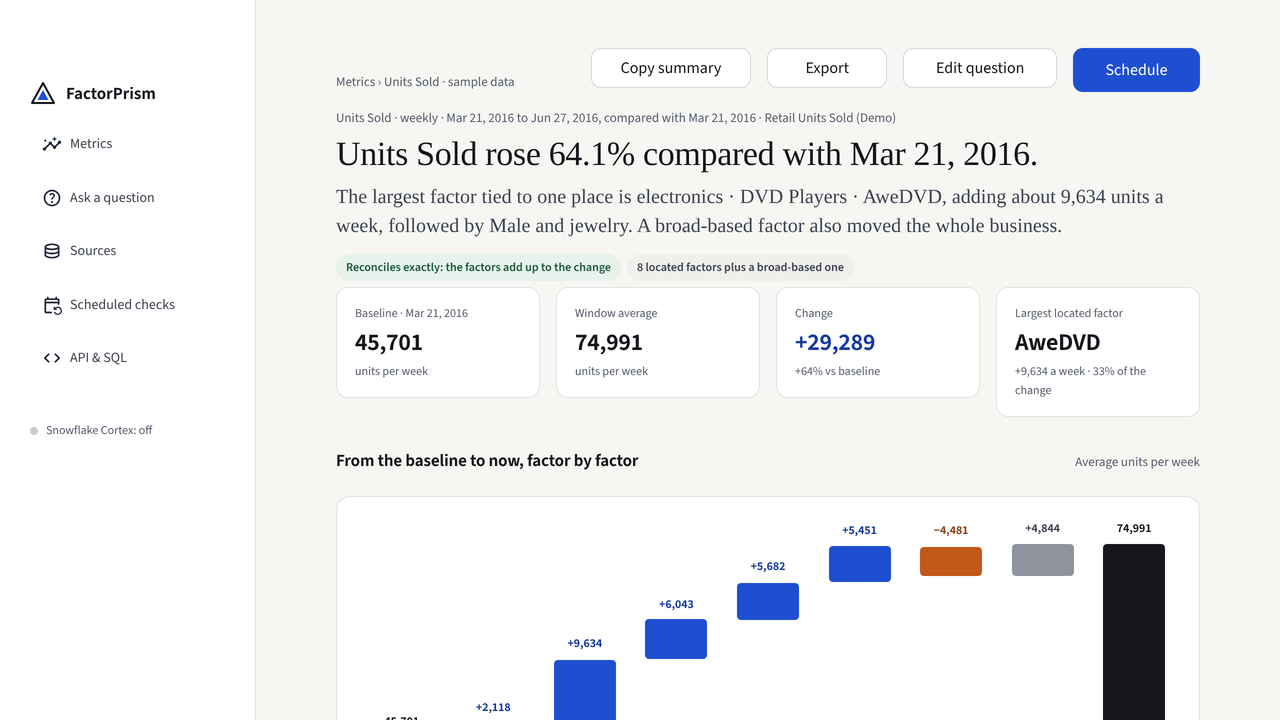
Units Sold rose 64.1% compared with Mar 21, 2016. The largest factor tied to one place is electronics · DVD Players · AweDVD, adding about 9,634 units a week, followed by Male and jewelry. A broad-based factor also moved the whole business.
Reconciles exactly: the factors add up to the changeA dashboard shows that it moved. Not why.
Someone has to explain the number before the next meeting. A pivot only finds the answer if you guess the right cut.
Every cut is a guess
Region, product, channel, customer, and every level inside them. Each filter shows another plausible pattern, and only among the cuts you thought to try.
Combinations hide
Region looks normal. Product looks normal. One product in one region drove the change, and no single view shows it.
Moves offset
A beat and a miss cancel out, so "on plan" can hide two large movements that both need an owner.
One Finding. The answer first, then the proof.
Ask about one number. FactorPrism tests every level of your dimensions and their combinations, and returns the result as a Finding.
- 1The answer in one sentenceWhat changed, by how much, and the factors that did it.
- 2A bridge that closes exactlyFrom the baseline to now, factor by factor. The factors add up to the change, with no balancing figure.
- 3Each factor placed where it actsA region, a product, a product in one region, or the whole business when the move is broad-based.
- 4When each factor was at workWeek by week, so a launch, a one-off spike and a slow drift look different.
- 5What to check nextFocused questions for the people who run that part of the business.
Follow any factor to the proof.
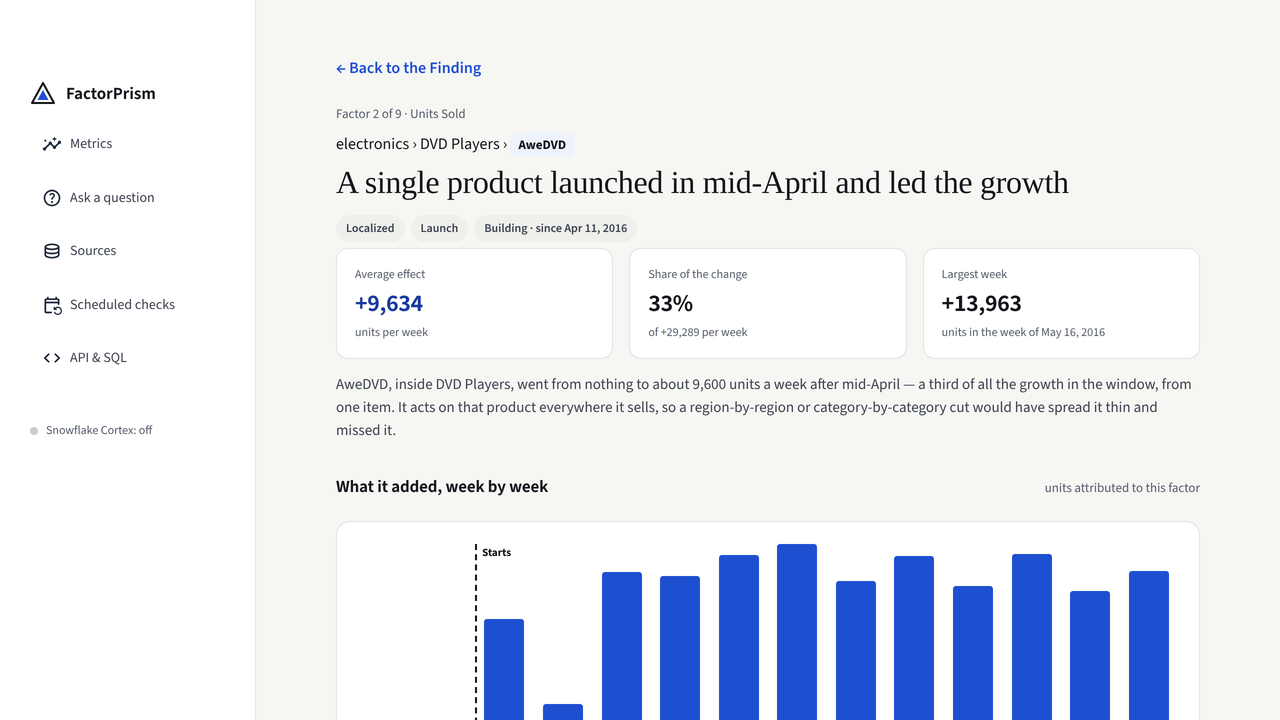
A factor is a claim. Each one opens to the evidence behind it, so the team can check it instead of debating it.
- What it added, period by period. When it started, whether it is still building, and its largest week.
- Where it acts, and why there. A factor any higher would move parts of the business that did not change; any lower explains less.
- Other places that explain it equally well. When the data cannot tell two readings apart, FactorPrism says so.
- Questions for the owner. Ready to copy into a message.
Ask the question. FactorPrism does the searching.
Connect one table or view
Grant read-only access from inside Snowflake. FactorPrism gives a quick read of the latest period right away.
Check the drafted question
It reads your columns and drafts the question: which number, which dates, which ways to slice it. Change any part in place.
Read the Finding
Ranked factors, where each acted, and what to check next. Run it again on new data, or schedule it, and see what changed since the last run.
Your data stays where it is governed.
FactorPrism is a Snowflake Native App installed from the Marketplace. There is no pipeline to build and nothing to copy out.
- Runs inside your account, on your warehouse, under your roles.
- Read-only access to the one table or view you choose. Remove it whenever you like.
- Nothing leaves Snowflake. No external service sees your data.
- Cortex is optional. It writes the interpretation; every number is computed without it.
Put the answer where the work happens.
The app is for people. The API returns the same analysis from one SQL call, so a Snowflake task, a pipeline or an approved agent can ask why a number moved.
-- Did this week's revenue move more than usual? If so, why?
CALL FACTORPRISM.API.RUN_VERDICT();

-- example result:
-- MODE      dominant
-- SENTENCE  Revenue fell 9% last week. Most of it came
--           from one product in the Northeast.
-- LEAD_FACTORS [{"label": "Northeast · Widgets", ...}]

-- The full ranked factor table for any window:
CALL FACTORPRISM.API.RUN_DECOMPOSITION(
  source_ref   => 'SOURCE_VIEW',
  date_field   => 'ORDER_DATE',
  metric_field => 'REVENUE', ...);
The questions that survive the first dashboard.
The total looks fine. One region does not.
A broad lift hides a regional slide until it is too large to miss.
Sales trend analysis FinanceOn plan, with two large misses inside.
Explain actual versus budget by where the variance began.
Budget vs actual MarginMargin slipped. Price, mix, or cost?
A margin bridge that ties out to the reported number.
Gross margin bridge RevenueA revenue bridge that ties to the dollar.
Every step of the walk from last period to this one, located.
Revenue bridge CustomersNet adds fell. Adds, churn, or mix?
Find the segment where the flow changed.
Net adds and churn HealthcareThe denial spike that was not a trend.
Payer, code and facility, searched together.
Claims and denialsTested against answers we already knew.
We planted known causes in controlled data and ran the engine blind. The results, including where it misses, are published.
blind runs against injected causes with known locations and sizes
reconciliation: the factors add up to the reported change, every time
about spread-out moves: when no single place explains the change, the Finding says so
Questions before you start
How do I find out why a metric changed in Snowflake?
Install FactorPrism from the Snowflake Marketplace and give it read-only access to the table or view that holds the metric. It reads the columns, drafts the question, and returns a Finding: the change in one sentence, the factors behind it, where each one acted, and how much each added, reconciled to the exact change.
Why can't a dashboard or pivot table explain the whole change?
A dashboard answers only the cut you ask for. You have to guess the right dimension and the right level, and the number of possible cuts multiplies with every dimension. When an effect lives in a combination, such as one product in one region, every single-dimension view can look normal. FactorPrism searches the levels and combinations together and places each factor where it acts.
What is a Finding?
The answer to one question about one metric: a sentence saying what changed and why, a bridge from the baseline to now that adds up exactly, the factors ranked largest first, when each was at work, and what to check next. Every factor opens to its evidence.
Does my data leave Snowflake?
No. FactorPrism is a Snowflake Native App. It runs inside your account, on your warehouse, with read-only access to the one table or view you choose. Nothing is sent to an outside service.
Do I need Snowflake Cortex?
No. Cortex can write a plain-language interpretation of a Finding, but every number, factor and contribution is computed without it.
Can I run it from SQL, a schedule or an AI agent?
Yes. The API returns the same analysis from one SQL call, so it runs from Snowflake tasks, pipelines, and approved agents such as Snowflake Cortex Code.
How much does it cost?
FactorPrism is free during early access, with no card required. After general availability it follows Snowflake's consumption model: you pay for the warehouse compute you use, billed through your Snowflake account, with no seat fees.
Bring the number your team is still debating.
We will walk through one real question with you, using a sample, a sanitized extract or a source you choose. No sensitive data needed to start.